


One question separates a chart that ages well from one that becomes an anchor. It does not get asked often enough in design sessions. The question: does this belong in the chart of accounts, or in a Dimension?
It sounds like a configuration detail. It is a strategic call, and the answer has more to do with how the business thinks about its data than with how Business Central is set up. Get it right and the chart stays clean, the reports get sharper, and the whole structure is easier to maintain. Get it wrong and the chart grows to compensate, and you land back in the over-segmented mess from Part 2.
What a Dimension actually is
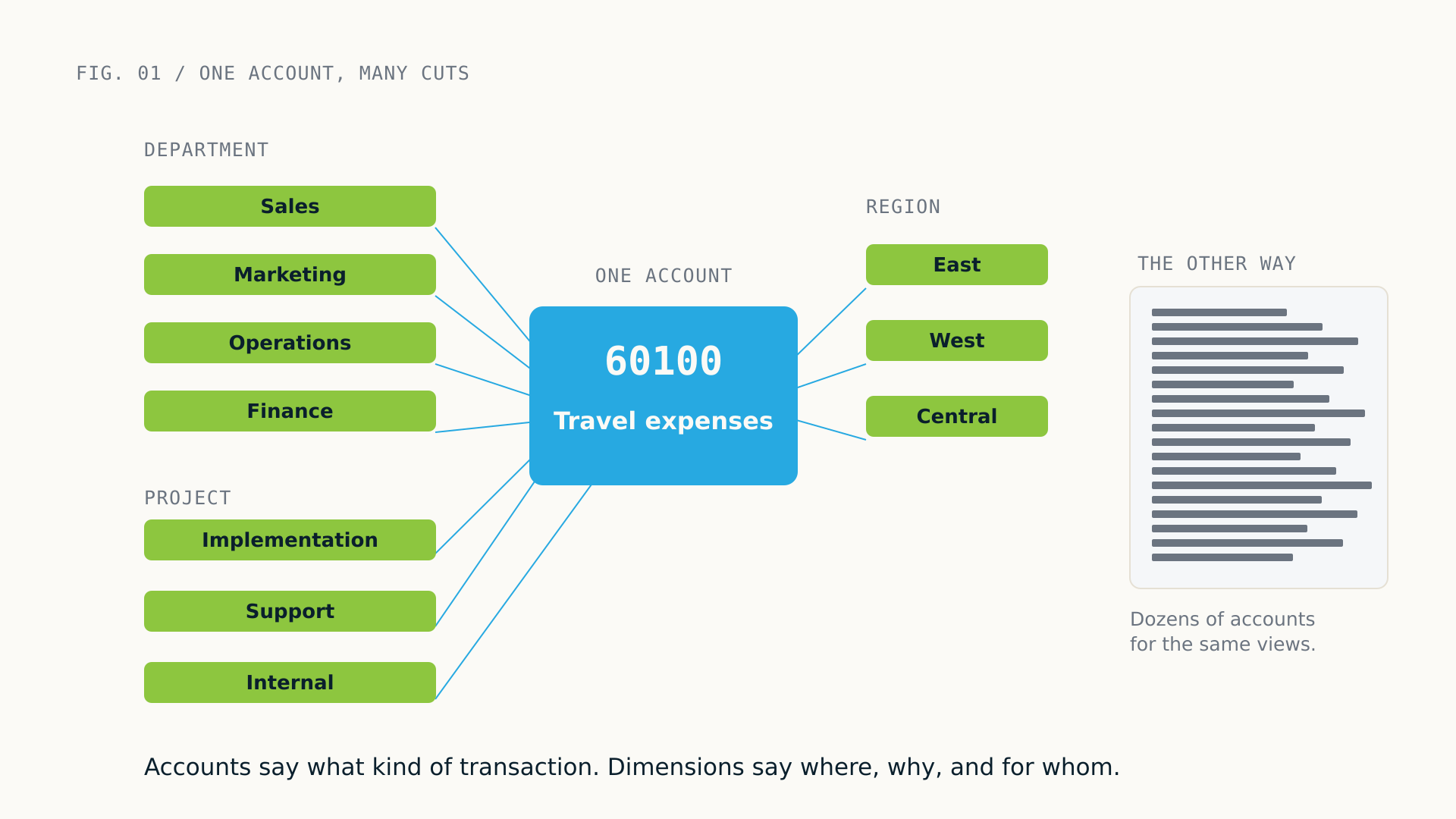
A Dimension is a tag. When a transaction posts, you attach one or more dimension values, and those values travel with it through the ledger. They are not accounts. They do not change the posting logic. They become filterable, groupable attributes you can slice financial data by in ways the chart alone cannot.
Say you want operating expenses by department. Two paths. Path one: an account for each department’s expenses, Travel for Sales, Travel for Marketing, Travel for Operations, multiplied across every expense category. Path two: one Travel account, and every transaction tagged with a Department value. The account stays clean, the reporting stays flexible, and when a department splits or disappears you update dimension values instead of re-architecting the chart.
Accounts answer one question: what kind of transaction was this? Dimensions answer another: where, why, for whom, and in what context did it happen?
How Business Central implements Dimensions
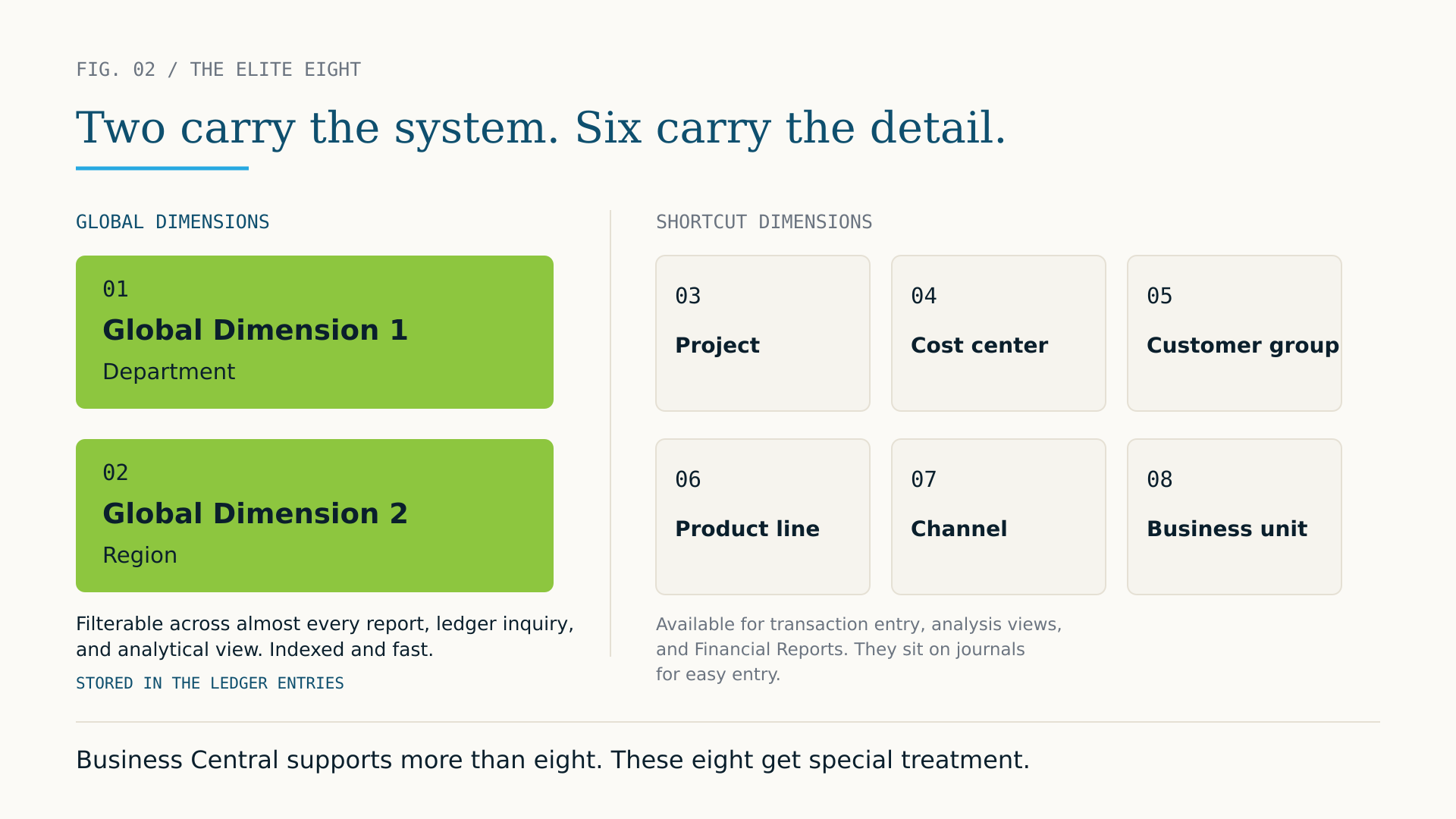
Business Central supports an unlimited number of Dimension definitions but treats eight of them specially. Call them the elite eight, since it is March and the reference is right there.
Two are Global Dimensions. Global Dimensions 1 and 2 are available as filter fields across almost every report, ledger inquiry, and analytical view in the system. They are indexed, fast, and deeply embedded in the reporting architecture, which makes them right for your most important, most frequently used attributes.
Six are Shortcut Dimensions. They are available for transaction entry and usable in analysis views and Financial Reports, and they sit on journals for easy entry, but they do not carry the same ubiquitous filter presence as Global Dimensions. You can use dimensions beyond the eight, but they enter differently and filter differently, so we will stay with the elite eight here.
The practical point: choosing Global Dimension 1 and 2 is a long-term decision. It is not easily changed after transactions post, because global dimension values are stored directly in the ledger entries. Most organizations should assign their two most universally important analytical attributes here. For many that is Department and a cost center or business unit. For others, Region and Project, or Legal Entity and Division. The right answer depends entirely on how the business measures its performance.
The two mistakes that define most implementations
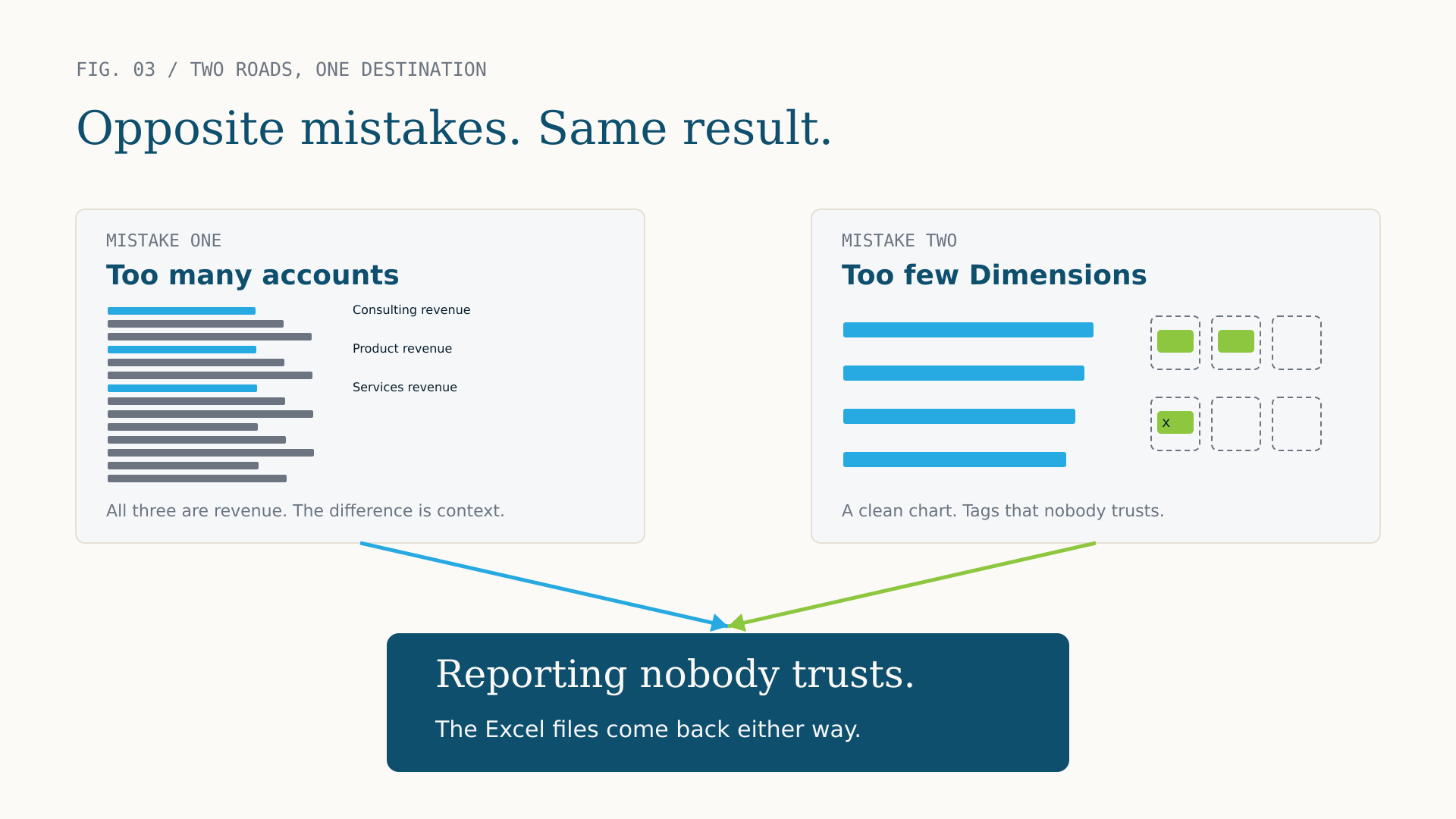
After 25 years with this platform and its predecessor NAV, the dimension-related problems fall into two buckets. They are mirror images, and they produce the same outcome: a reporting structure that is harder to work with than it should be.
Mistake one: too many accounts
The more common one, with a familiar origin story. The old system had no real dimension capability, so every time someone needed a new analytical cut, they added an account. Revenue by product line became twenty revenue accounts. Operating expense by region became a matrix you need a spreadsheet to navigate. Import that chart into Business Central without questioning it and you inherit all the complexity and miss the opportunity Dimensions represent. The signal to watch for: accounts that are identical except for one attribute. Consulting Revenue, Product Revenue, and Services Revenue are all revenue. The difference between them is analytical context, and context belongs in a Dimension, not in three accounts.
Mistake two: too few dimensions
Less common, often more damaging over time. The chart is clean, sometimes impressively so, but only one or two dimensions are configured and tagging discipline is loose. Transactions post without dimension values, or with values that vary across the team, and the dimension data becomes unreliable. When it is unreliable, users stop trusting it. When they stop trusting it, they stop using it. The Excel files come back, and the chart starts growing again to compensate.
Dimensions only pay off when the organization commits to populating them consistently. That takes training, mandatory dimension rules on the accounts where tagging is non-negotiable, and someone who owns the value lists as the business changes. One practical tool: default dimension values on master records. Customers, vendors, items, and general ledger accounts can each carry defaults, so transactions get tagged automatically instead of by hand every time. Used well, it cuts the governance burden sharply and is one of the features that separates clean dimension data from the struggle.
A clean chart with underpopulated dimensions is not better than an over-segmented chart. It is a different reporting problem. You want both: a chart with structural integrity and dimensions populated with discipline.
The decision framework
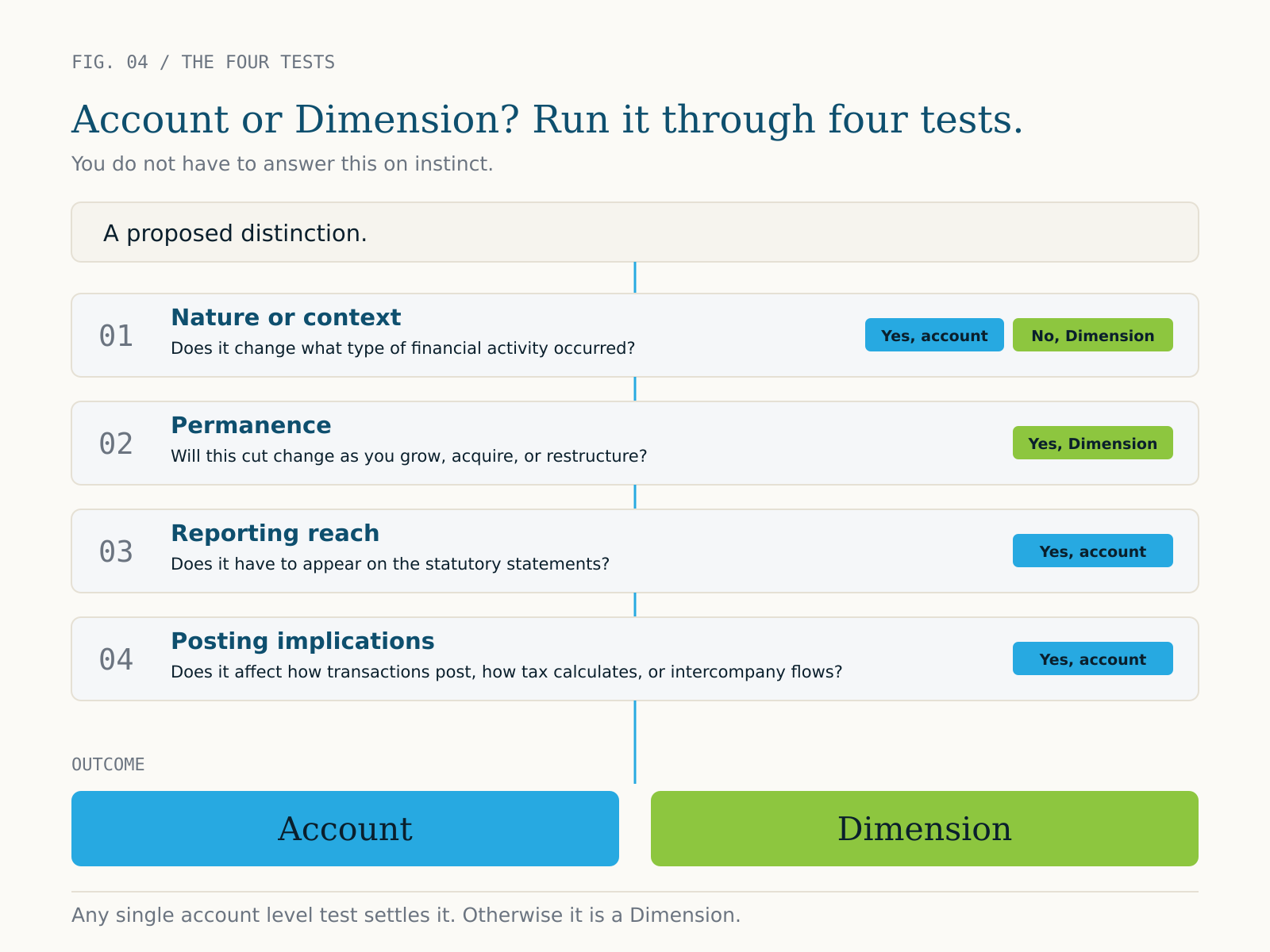
You do not have to answer account versus dimension on instinct. Run the distinction through four tests.
01 Nature or context. If the distinction changes what type of financial activity occurred, it is an account. Revenue is fundamentally different from cost of goods sold. If it changes the context of the activity rather than its nature, it is a candidate for a Dimension. East region revenue and west region revenue are both revenue; the region is context.
02 Permanence. Accounts are hard to retire once posted against. Dimension values can be deactivated and new ones added as the business evolves. If the cut is likely to change as you grow, acquire, or restructure, a Dimension handles that more gracefully.
03 Reporting reach. If the distinction has to appear on the statutory statements, the income statement, or the balance sheet, it is almost certainly an account. Statutory reporting draws from the chart. Management reporting draws from both the chart and dimension filters. Purely management or operational visibility points to a Dimension.
04 Posting implications. If the distinction affects how transactions post, how tax calculates, or how intercompany flows, that is an account-level concern in Business Central.
Getting the Global Dimension decision right
Because Global Dimensions 1 and 2 carry special weight, the choice deserves deliberate thought, not a quick default. The most useful test: which two attributes will appear in the most reports, drive the most management conversations, and need to be filterable across the widest range of ledger inquiries? Those are your Global Dimensions.
Department is the most common Global Dimension 1 in mid-market implementations, for good reason. It cuts across the entire income statement and is the most requested filter in management reporting. Cost Center, Division, or Business Unit fill the same role where those are the primary accountability structure. Global Dimension 2 varies more: Region, Project Category, and Legal Entity are all common, depending on how the organization is built. Breadth of use decides, not the label. If a value will be relevant on only a subset of transactions, it probably belongs as a Shortcut Dimension.
One flag: changing Global Dimensions after go-live is possible but disruptive. It requires a data correction process that touches posted ledger entries, and it should be avoided where you can. Getting the designation right in design pays quiet dividends. When it is correct, no one notices. When it is wrong, it becomes a recurring conversation for years.
Business Central can produce excellent financial reports, but only if the chart gives it structure and the dimensions give it depth. You need both. One without the other is a half-built foundation.
What good looks like
An implementation that has the dimensions question right tends to look the same. The chart has somewhere between 100 and 300 accounts for a mid-market organization, depending on complexity, and each one is structurally distinct, a genuinely different type of activity rather than a variation of context on the same activity.
Two Global Dimensions are set around the primary accountability and analytical structures. Two to four Shortcut Dimensions capture the next tier of context. The value lists are owned by someone, not left to grow unchecked. Transactions are tagged consistently because mandatory dimension rules sit on the accounts that matter most. And Financial Reports build cleanly because the data underneath has both structure and depth. That combination is what makes Business Central reporting powerful, not the tool in isolation.
Next: everything in Parts 1 through 3 assumes the design conversation happens at the right time. Part 4 is about making sure it does. It covers the reporting requirements to capture before a single account or dimension exists, and it is the part most implementations skip.