

Copilot Studio
Copilot Studio is a low-code platform for building AI agents and chatbots that connect to your business data and deploy across Teams, web portals, and Microsoft 365 Copilot. Give your agent a useful job. Preferably one your team is tired of doing.
Why Copilot Studio
Give business conversations a useful next step
Copilot Studio lets teams build agents that answer from approved knowledge and call tools or workflows when a conversation needs action. A sound design starts with the audience, source ownership, permitted actions, escalation path, and a way to observe cost and answer quality.
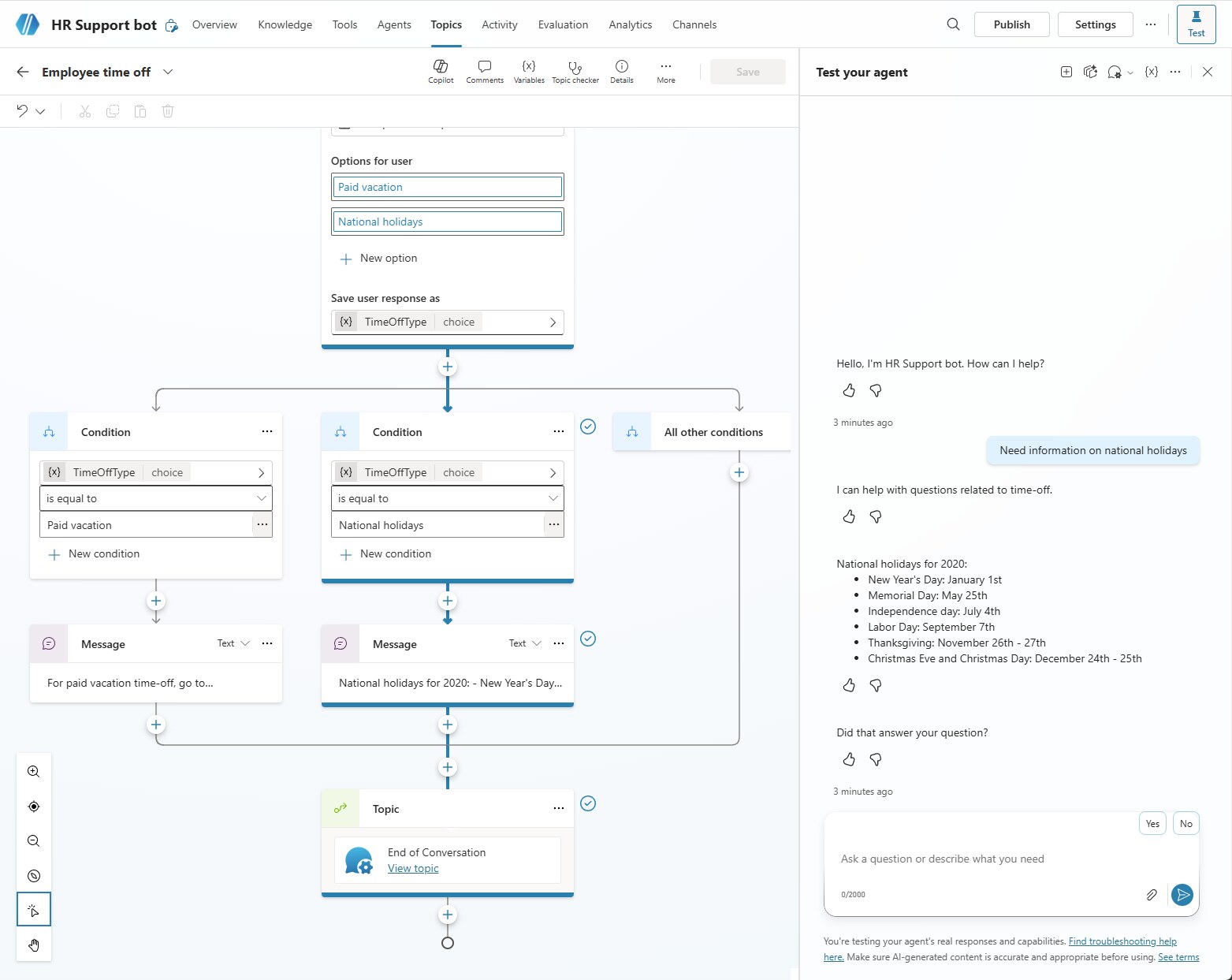
What you can do with Copilot Studio
Low-code agent builder.
Use drag-and-drop and natural language prompts to design custom AI assistants without a development team.
Multi-channel deployment.
Launch your agent in Teams, web portals, Microsoft 365 Copilot, or embed it in custom apps.
Enterprise data access.
Power your agents with Dynamics 365, Dataverse, websites, files, or external systems as knowledge sources, including legacy systems.
Governance and ALM built in.
Manage deployment pipelines, monitor usage, control publishing, and handle compliance, all inside the Studio.
Sound familiar?
When Copilot Studio is worth a closer look
Start with the work that needs to change. These are useful reasons to assess the fit.
- People ask repeatable questions or need guided help across a defined set of business sources.
- The organization can identify which actions an agent may take, which require approval, and which must remain with a person.
- The team can manage channels, identity, connector credentials, testing, content changes, usage, and credit consumption.
What changes for your team
| Pain point | The fix | The result |
|---|---|---|
| Rigid chatbots with no context | Knowledge-grounded agents connected to enterprise data | Chats that feel human and informed |
| Channels that don’t talk to each other | Multi-channel deployment into Teams, web, and Microsoft 365 | One agent, everywhere at once |
| Bot-building turns into a drawn-out dev project | Low-code UI plus Copilot prompts | Real bots built in hours, not weeks |
| Zero visibility or control over deployed bots | Built-in ALM and compliance dashboard | Governance you can trust without slowing releases down |
Copilot Studio with TruNova
The partner behind the implementation
TruNova scopes the agent, grounds it in approved sources, connects controlled actions, and supports channel, security, testing, credit monitoring, and human handoff decisions.
Separate software from services
Software pricing and implementation costs
Standalone Copilot Studio is a tenant wide capacity and usage model, not a simple per user license. A capacity pack provides 25,000 Copilot Credits for $200 per month paid yearly, while pay as you go bills consumed credits monthly and requires an Azure subscription. Actions and responses consume varying credit amounts based on use. Microsoft 365 Copilot includes an in product agent experience for licensed users in internal Microsoft 365 scenarios, while standalone Copilot Studio supports broader channels and external users. Model usage, connectors, channels, Dataverse, and other services can have additional terms or charges.
| Plan or option | Published US price | Billing and scope |
|---|---|---|
| Copilot Studio Copilot Credit capacity pack | $200.00 | per 25,000 Copilot Credits/month, paid yearly; tenant wide capacity pack |
| Copilot Studio pay as you go | Variable | per Copilot Credit consumed, billed monthly; Azure subscription required |
| Copilot Studio pre purchase plan | Variable | prepaid Copilot Credit Commit Units purchased upfront; tiers and discounts vary |
US pricing checked September 7, 2026. Copilot Studio pricing and credits Use connectors in Copilot Studio agents Publish agents to channels and clients Connect an agent to Teams and Microsoft 365 Copilot Prices, availability, taxes, and regional terms may vary.
What changes the implementation budget?
- The number and quality of topics, knowledge sources, languages, answer types, model choices, evaluation sets, and content owners affects design, testing, and ongoing tuning.
- Each connector, flow, REST API, custom tool, credential mode, approval, and data policy adds decisions. Limit tools to the actions the agent is allowed to call and test both successful and refused requests.
- Internal or external channels, audience size, authentication, escalation, expected conversation patterns, credit consumption, monitoring, and content release ownership shape the operating model.
Software fees do not include TruNova implementation services. Our estimate tool provides an initial planning range. We confirm scope, dependencies, and pricing during discovery.
Works with your wider business
Keep the tools. Connect the work.
Microsoft Dataverse
Dataverse can provide structured records and actions for an agent. Confirm table permissions, the environment, maker or user credentials, record ownership, and the difference between information the agent may read and actions it may take.
Power Automate
An agent can call a flow for a deterministic action such as routing, approval, or record update. Define explicit inputs and outputs, flow ownership, connector credentials, approval boundaries, duplicate protection, and the license and data policy required by the flow.
Power Pages
An agent can be published to a Power Pages website for an external or authenticated audience. Confirm site authentication, web and table permissions, channel configuration, credit usage, protected actions, and the human fallback path before launch.
Where this shows up
Industries that use this most: financial services, healthcare and life sciences, manufacturing, professional services, retail and e-commerce.
Questions about Copilot Studio
Before you decide
Is Copilot Studio priced per user?
Standalone Copilot Studio is sold primarily through tenant wide Copilot Credit capacity packs and usage based billing. Microsoft publishes a $200 pack for 25,000 Copilot Credits per month paid yearly. Pay as you go bills consumed credits monthly and requires an Azure subscription, and each action or response can use a different number of credits. Microsoft 365 Copilot includes internal agent capabilities for licensed users in its supported Microsoft 365 scenario, which is a different licensing path.
How do we connect an agent to systems and keep actions controlled?
Use a connector, flow, REST API, or other tool with a narrow purpose and a clear description. Decide whether the tool uses user or maker credentials, apply data policies, limit actions, validate inputs, log outcomes, and require approval where a change is material. The agent’s answer should not become the source of truth for a record it did not successfully update.
When should a team use Copilot Studio instead of a deterministic Power Automate flow?
Copilot Studio is useful when people need conversational guidance, grounded answers, or a choice among supported actions. Power Automate is usually clearer for a deterministic process with fixed triggers, rules, and outputs. An agent can call a flow, but the flow still needs explicit validation, ownership, approvals, monitoring, and recovery.
Work with TruNova
Where are you starting?
Start
Outgrown the tools you have? Let us plan the next system around your team.
Optimize
Already using the tools? Let us help with the steps that still take too much work.
Rescue
In the middle of an implementation that is going wrong? Bring us what is stuck.
Support and ongoing education for your system and your team.
Already using Copilot Studio? The $4,000 System optimization review covers one application over two weeks, with up to five priority pain points and a report with cost estimates. Implementation of recommendations is a separate project.

What could your project cost?
Wondering what it would take? Tell the estimate tool a little about your team and your systems for an initial planning range. We can talk through the details together.
A starting point for planning. We confirm scope and pricing during discovery.