

Microsoft 365 Copilot for Finance
Microsoft 365 Copilot for Finance drafts board-ready reports, flags financial anomalies, and builds forecasts directly in Excel, Outlook, Word, and Teams, using your real financial data instead of manual spreadsheet work. We appreciate a well-balanced spreadsheet. We also appreciate getting home for dinner.
Why Microsoft 365 Copilot for Finance
Finance Agent with the numbers in context
Microsoft’s current documentation describes Finance Agent as a capability included with Microsoft Copilot, with connected ERP work requiring the appropriate Microsoft 365 and ERP access. The older Copilot for Finance label still appears in some material. TruNova helps finance and IT teams assess the data connection, permissions, review steps, and operating routine before adoption.
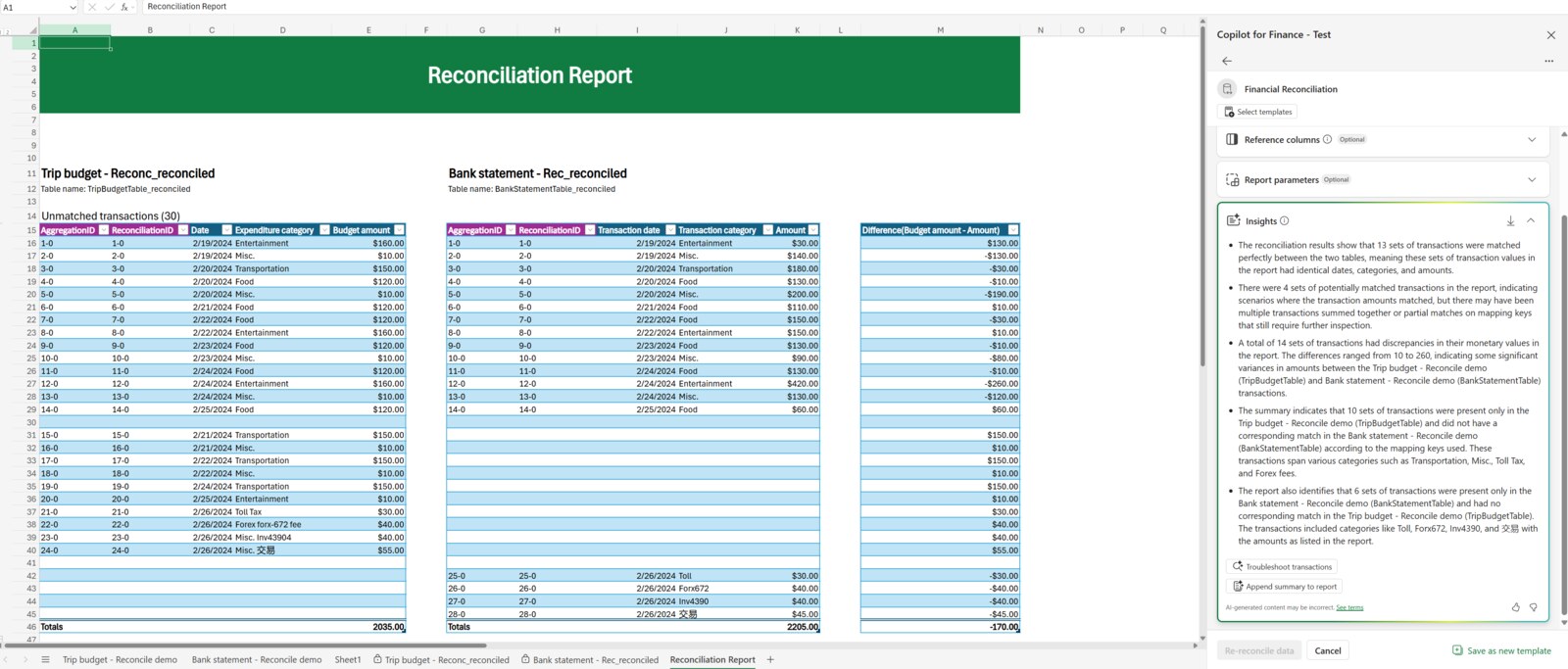
What you can do with Microsoft 365 Copilot for Finance
Contextual data analysis.
Pulls live numbers directly from Excel, your ERP, or other finance systems to build its insights on your actual figures.
Smart reporting.
Drafts summary narratives, board-ready briefings, and variance explanations in seconds instead of hours.
Risk detection.
Flags outliers like budget overruns or cash flow dips before they become a bigger problem.
Governed and secure.
Works inside your Microsoft tenant with full enterprise control and audit logs.
Sound familiar?
When Microsoft 365 Copilot for Finance is worth a closer look
Start with the work that needs to change. These are useful reasons to assess the fit.
- Finance teams have a repeatable need for variance review, reconciliation support, reporting context, or questions across approved ERP data.
- Your ERP and Microsoft 365 administrators can define which users, records, sources, and actions are in scope.
- Reviewers are prepared to verify AI assisted output against the source records and existing finance processes.
What changes for your team
| Pain point | The fix | The result |
|---|---|---|
| Reports built with manual copy-paste | Copilot auto-generates commentary and decks | Timely insights, fewer errors |
| No real-time forecasting | Live data feeds directly into intelligent forecasting models | Faster response when markets shift |
| Anomalies or risks go overlooked | Instant anomaly detection and alerts | Better oversight, fewer surprises |
| Security concerns with new AI tools | Fully governed within your Microsoft tenant | AI that follows your policies instead of creating new risk |
Microsoft 365 Copilot for Finance with TruNova
The partner behind the implementation
TruNova helps with finance workflow discovery, ERP and data connections, reporting context, adoption planning, training, and support.
Separate software from services
Software pricing and implementation costs
Microsoft’s current materials do not present a separate, clean US list price for the older Copilot for Finance label. Current documentation uses Finance Agent and points to Microsoft Copilot licensing. Confirm the exact tenant, ERP, user, connector, and channel entitlements before purchase.
| Plan or option | Published US price | Billing and scope |
|---|---|---|
| Microsoft 365 Copilot | $30.00 | US user/month, paid yearly. A qualifying Microsoft 365 subscription is required for the licensed Microsoft 365 Copilot experience. |
| Finance Agent in Microsoft Copilot | Included with Microsoft Copilot | Microsoft’s current sign up guidance describes Finance Agent as an included capability. Connected ERP actions and Microsoft 365 connected capabilities have separate license and prerequisite requirements. |
| Connected ERP access | Requires confirmation | The ERP license, user access, environment, connector, and any Microsoft Product Terms determine the connected data entitlement. |
US pricing checked September 7, 2026. Finance Agent sign up FAQ Deploy Finance Agent Microsoft 365 Copilot enterprise pricing License options for Microsoft Copilot Prices, availability, taxes, and regional terms may vary.
What changes the implementation budget?
- The ERP product, tenant and user licensing, connection method, permissions, environment, and data that Finance Agent can access.
- The finance questions, variance definitions, reporting periods, source reconciliation, and human review steps that make an answer usable.
- The rollout group, training, prompt and review habits, support ownership, and controls for changes to financial processes.
Software fees do not include TruNova implementation services. Our estimate tool provides an initial planning range. We confirm scope, dependencies, and pricing during discovery.
Works with your wider business
Keep the tools. Connect the work.
Dynamics 365 Business Central
Assess Finance Agent with Business Central when the ERP records, permissions, and finance review steps are clear and the connection is supported for the scenario.
Power BI
Align finance reporting definitions and source ownership before using a Copilot assisted explanation alongside established Power BI reporting.
Power Automate
Review finance approvals and notifications for supported automation only after the process owner, permissions, exception path, and audit needs are defined.
Where this shows up
Industries that use this most: financial services, healthcare and life sciences, manufacturing, professional services, retail and e-commerce.
Questions about Microsoft 365 Copilot for Finance
Before you decide
Is Copilot for Finance still a separate Microsoft SKU?
Microsoft’s current documentation uses Finance Agent and describes Finance as a capability included with Microsoft Copilot. Older Copilot for Finance materials may describe a different offer, so confirm the current tenant, ERP, user, and channel entitlement before budgeting.
Can Finance Agent use our ERP data?
It can be connected to an ERP when the required Microsoft 365 and ERP access, permissions, environment, and connection are in place. Discovery confirms which records should be available and how finance staff will review the result against source data.
What should a finance team review before adopting it?
Review data access, reporting definitions, variance and reconciliation routines, human review, user roles, and support ownership. A contained finance workflow gives the team a way to test the fit without changing the source of record prematurely.
Work with TruNova
Where are you starting?
Start
Outgrown the tools you have? Let us plan the next system around your team.
Optimize
Already using the tools? Let us help with the steps that still take too much work.
Rescue
In the middle of an implementation that is going wrong? Bring us what is stuck.
Support and ongoing education for your system and your team.
Already using Microsoft 365 Copilot for Finance? The $4,000 System optimization review covers one application over two weeks, with up to five priority pain points and a report with cost estimates. Implementation of recommendations is a separate project.

What could your project cost?
Wondering what it would take? Tell the estimate tool a little about your team and your systems for an initial planning range. We can talk through the details together.
A starting point for planning. We confirm scope and pricing during discovery.