

Dynamics 365 Customer Service
Dynamics 365 Customer Service is an AI-enhanced service platform that unifies chat, voice, cases, and knowledge into one workspace for support teams. Customers have questions. Finding their history shouldn't be another one.
Why Dynamics 365 Customer Service
Make the next service interaction easier
Dynamics 365 Customer Service brings case management, knowledge, self-service, and service representative tools into one workspace. It fits teams that need a consistent way to route questions, document work, and learn from service activity.
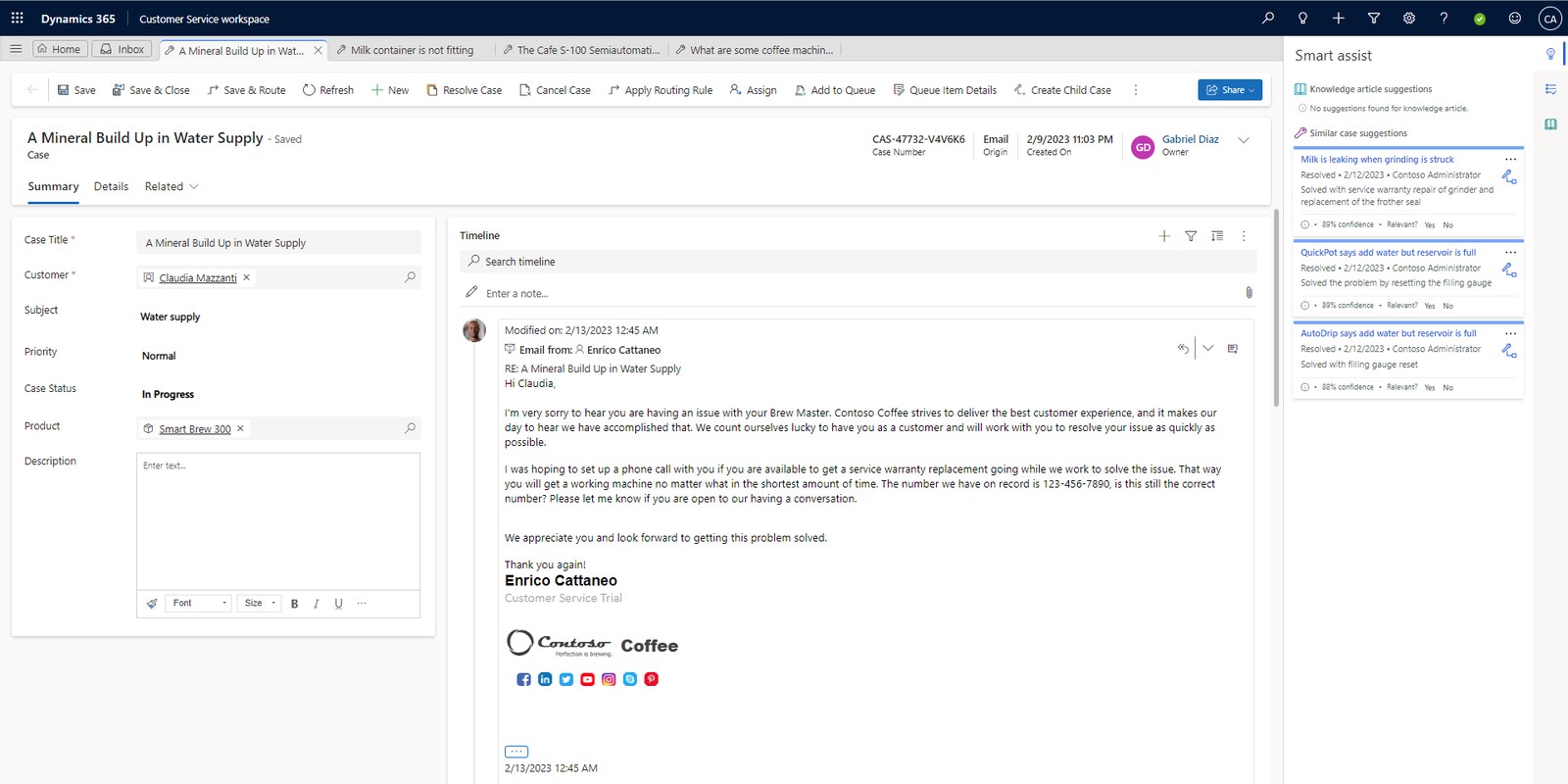
What you can do with Dynamics 365 Customer Service
Omnichannel coverage
Chat, voice, SMS, and social all flow into one queue.
Copilot for reps
Generative AI drafts responses, surfaces knowledge articles, and helps route cases.
Case intelligence
Auto-creates cases from email and unifies routing and SLAs with Copilot admin tools.
Analytics dashboards
Embedded insights track satisfaction, agent load, and SLA performance.
Sound familiar?
When Dynamics 365 Customer Service is worth a closer look
Start with the work that needs to change. These are useful reasons to assess the fit.
- Service teams need shared case, knowledge, and self-service processes.
- Managers need clearer routing, queue ownership, and service activity visibility.
- The organization is ready to define service channels, customer data, and escalation rules before configuration.
What changes for your team
| Pain point | The fix | The result |
|---|---|---|
| Agents toggle between endless apps to resolve issues | Copilot Service Workspace unites live chat, cases, voice, and email in one pane | Faster resolutions, fewer context switches |
| Customers repeat themselves across channels | Unified routing and omnichannel history keep context intact | Better CSAT, smoother conversations |
| Manual case creation and scoring slow things down | Auto-case creation, AI-powered intent recognition, and knowledge suggestions | Faster fix times, fewer overlooked tickets |
| No visibility into agent or operational performance | Real-time dashboards, KPI tracking, and embedded analytics | Smarter resourcing, proactive improvements |
Dynamics 365 Customer Service with TruNova
The partner behind the implementation
TruNova helps teams scope, configure, integrate, train, and support Dynamics 365 Customer Service around their service process and customer data.
Separate software from services
Software pricing and implementation costs
US list price checked September 7, 2026. Checkout price can vary by country, currency, and regional terms. Minimum purchase and license prerequisites may apply; confirm your agreement. Customer Service Premium includes base Copilot Credit capacity, and Microsoft notes that a separate Power BI license may be required to configure access to embedded Power BI content. Prices cover the software subscription; implementation, integrations, data work, training, support, taxes, and partner apps are separate.
| Plan or option | Published US price | Billing and scope |
|---|---|---|
| Dynamics 365 Customer Service Professional | $50.00 USD | per user per month, paid yearly |
| Dynamics 365 Customer Service Enterprise | $105.00 USD | per user per month, paid yearly |
| Dynamics 365 Customer Service Premium | $195.00 USD | per user per month, paid yearly |
US pricing checked September 7, 2026. Microsoft Dynamics 365 Customer Service pricing Microsoft Dynamics 365 Customer Service product overview Microsoft Dynamics 365 Customer Service documentation Microsoft Dynamics 365 Services Product Terms Prices, availability, taxes, and regional terms may vary.
What changes the implementation budget?
- Case types, queues, routing rules, service levels, escalation paths, and knowledge ownership determine the process design.
- Existing cases, contacts, knowledge content, email, chat, telephony, and CRM data affect migration and integration work.
- Self-service content, representative workspaces, security roles, reporting, testing, and training shape the configuration effort.
Software fees do not include TruNova implementation services. Our estimate tool provides an initial planning range. We confirm scope, dependencies, and pricing during discovery.
Works with your wider business
Keep the tools. Connect the work.
Dynamics 365 Contact Center
Add digital and voice channel capabilities when the service model needs a broader contact center experience.
Power Automate
Connect case events and approvals to defined workflow processes with the right permissions and ownership.
Power BI
Use service activity data for reporting and dashboards, with licensing checked for any embedded content.
Where this shows up
Industries that use this most: financial services, healthcare and life sciences, manufacturing, professional services, retail and e-commerce
Questions about Dynamics 365 Customer Service
Before you decide
What does Dynamics 365 Customer Service licensing cost?
Microsoft lists Professional, Enterprise, and Premium as per user per month plans paid yearly. Confirm the license mix for representatives, supervisors, and other users, then budget separately for channels, Copilot capacity, implementation, integrations, training, support, taxes, and partner apps.
How do we know if Dynamics 365 Customer Service is a fit?
It is worth assessing when service work needs shared cases, knowledge, self-service, routing, and activity history. The right design depends on channels, queues, customer data, service policies, escalation needs, reporting, and the roles that will use the system.
What affects the Customer Service implementation schedule?
There is no universal timeline. Case and knowledge migration, channel choices, routing, security, integrations, reporting, testing, and content readiness all affect the work. TruNova confirms the sequence and scope during discovery.
Work with TruNova
Where are you starting?
Start
Outgrown the tools you have? Let us plan the next system around your team.
Optimize
Already using the tools? Let us help with the steps that still take too much work.
Rescue
In the middle of an implementation that is going wrong? Bring us what is stuck.
Support and ongoing education for your system and your team.
Already using Dynamics 365 Customer Service? The $4,000 System optimization review covers one application over two weeks, with up to five priority pain points and a report with cost estimates. Implementation of recommendations is a separate project.

What could your project cost?
Wondering what it would take? Tell the estimate tool a little about your team and your systems for an initial planning range. We can talk through the details together.
A starting point for planning. We confirm scope and pricing during discovery.