

Dynamics 365 Business Central
Bring finance, inventory, projects, and sales together in Business Central, with fewer spreadsheets and less work between systems. Your spreadsheet called. It would like a smaller job.
Why Business Central
A growing business has enough moving parts.
Your accounts, stock, sales, and project work should tell the same story. Business Central brings them into one system so your team can spend less time reconciling information and more time using it.
It also works with the Microsoft tools your team already uses, including Teams, Power BI, and the Power Platform.
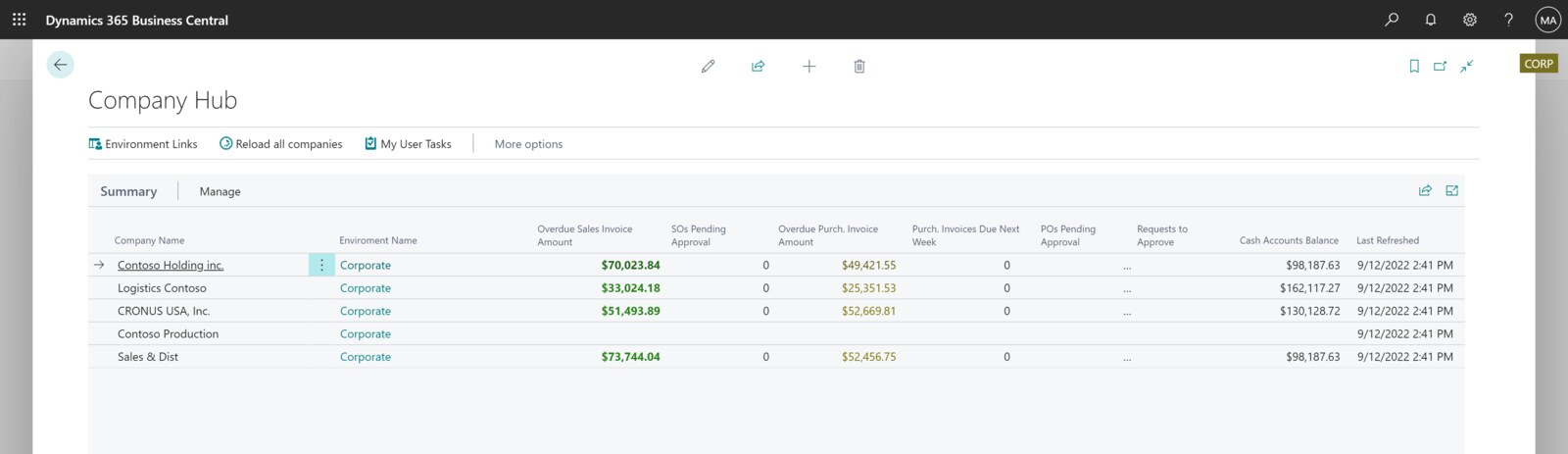
The everyday work, connected
Less back and forth. More getting things done.
Keep the numbers connected
Work with your general ledger, receivables, payables, and budgets in one place.
Know what is in stock
Plan purchasing, manage inventory, and coordinate warehouse work with demand.
Get projects through to billing
Track jobs, time, and expenses, then use that information to invoice accurately.
See what needs attention
Use dashboards and Power BI to turn operational data into reports your team can act on.
Sound familiar?
You might need Business Central if…
Start with what is making work harder. These are some of the signs it is time to look at a connected system.
- Finance, inventory, and projects each have their own version of the numbers.
- Orders or production depend on spreadsheets and manual handoffs.
- Your business is growing faster than your current tools can keep up.
- You need stronger financial controls and a system your team can manage.
From the problem to the work
What could work better?
| What gets in the way | What changes | What that helps you do |
|---|---|---|
| Separate finance, inventory, and project systems | One ERP across those functions | A shared view with less rekeying |
| Manual stock planning | Connected demand, purchasing, and inventory | Better information for replenishment decisions |
| Time and expenses disconnected from billing | Project tracking and billing in the same system | A clearer path from work completed to invoice |
| Answers buried in spreadsheets | Dashboards and connected reporting | Less time assembling the numbers |
Business Central implementation by TruNova
The partner behind the implementation
TruNova, powered by TruNorth Dynamics, implements Business Central and helps teams improve or recover existing implementations. Our work includes discovery, configuration, data migration, integrations, training, and support.
For Great Bend Recreation Commission, TruNova led the move from Dynamics GP and worked with Integrity Data on payroll. For FCCS, the work combined a move from Dynamics SL with reporting, tailored layouts, and training. Meet TruNova and explore the customer stories below.
Budgeting for Business Central
Software pricing and implementation costs
Microsoft’s published US prices are $80 for Essentials, $110 for Premium, and $8 for Team Members per user per month, paid yearly. Implementation services are separate.
| License | USD per user/month | What it covers |
|---|---|---|
| Essentials | $80 | Finance, sales, purchasing, inventory, projects, and warehouse management. |
| Premium | $110 | Essentials capabilities plus manufacturing and service order management. |
| Team Members | $8 | Limited reading, approvals, and selected updates. Not a full user license. |
US pricing checked September 7, 2026. Currency, country, taxes, and regional terms can affect the amount billed. Check current Microsoft pricing.
What changes the implementation budget?
Data cleanup and migration, the number of companies, integrations, reporting, extensions, manufacturing requirements, training, and testing all affect the work. Payroll and other partner apps may add separate subscription and implementation costs. A useful budget separates software licenses, implementation, and ongoing support.
Our estimate tool provides a preliminary planning range based on your scope. We confirm that scope before quoting the project.
Works with your wider business
Keep the tools. Connect the work.
Power BI
Build dashboards that bring financial and operational information together.
Microsoft 365 and Teams
Share information and work with colleagues in the tools you use every day.
Power Platform
Connect processes, automate recurring work, and build apps around your needs.
Dynamics 365 Sales
Connect customer and sales work with the systems that handle orders and finance.
Built around the way you work
The same platform. Different working days.
Explore how these needs show up in your industry.
Manufacturing · Professional services · Nonprofits · Retail and commerce · Healthcare and life sciences
Questions buyers ask
Before you decide
How long does a Business Central implementation take?
The schedule depends on scope, data readiness, integrations, and the time your team can commit to decisions and testing. Great Bend Recreation Commission moved from Dynamics GP to Business Central in about five months from scoping to launch. That is a documented project example, not a promise for every implementation. Read Great Bend’s story.
Does Business Central include payroll?
For US payroll, plan for a payroll application or a connection to your payroll provider. Business Central supports importing payroll transactions; its standard financial functions are not a complete US payroll processing service. TruNova worked with Integrity Data on Great Bend’s integrated payroll. Microsoft payroll integration documentation.
Should we choose Essentials or Premium?
Essentials covers core financial and operational work. Premium adds manufacturing and service order management. Choose based on the processes you need to run, then confirm user access and partner app requirements. Team Members provides limited access and does not replace a full user license.
How does Business Central compare with QuickBooks?
The QuickBooks edition matters. QuickBooks Enterprise includes inventory capabilities, so the decision is not simply whether you hold stock. Compare the actual gaps in company reporting, purchasing, projects, manufacturing, and integrations. Business Central is worth assessing when you need those processes in a connected ERP.
How does Business Central compare with NetSuite?
Both are cloud ERP options. NetSuite OneWorld supports multiple subsidiaries and international operations. Business Central connects financial and operational work with the Microsoft ecosystem. Compare company structure, local requirements, inventory, reporting, integrations, partner apps, and the full implementation scope using the same business scenarios.
How does Business Central compare with Finance and Operations?
Business Central combines financial and operational capabilities for small and medium businesses. What buyers call Finance and Operations is now represented by applications including Dynamics 365 Finance and Supply Chain Management, with deeper enterprise financial and supply chain capabilities. Complexity and process requirements matter more than headcount alone.
Where are you starting?
New project, existing system, or a stalled rollout?
Start
Plan a new Business Central implementation around the work your team needs to do.
Optimize
Find and improve the processes that are slowing down an existing system.
Rescue
Get an independent view of a stalled implementation and a plan to recover it.
Already using Business Central? Our $4,000 System optimization review covers one application over two weeks, with up to five priority pain points and a report with cost estimates. Implementing the recommendations is a separate project.

Plan your Business Central project
What could your implementation cost?
Wondering what it would take? Tell the estimate tool a little about your team and your systems for an initial planning range. We can talk through the details together.
A starting point for planning. We confirm scope and pricing during discovery.