

Dynamics 365 Contact Center
Dynamics 365 Contact Center is a generative AI, cloud-native contact center that merges voice, chat, SMS, social, and email into one agent workspace with built-in self-service and smart routing. So many ways to say hello. Let's make the handoff less of a guessing game.
Why Dynamics 365 Contact Center
Bring every customer conversation into view
Dynamics 365 Contact Center combines digital and voice channel capabilities with self-service, routing, and conversation support. It is designed to work with an existing CRM, so channel decisions and customer context can be planned together.
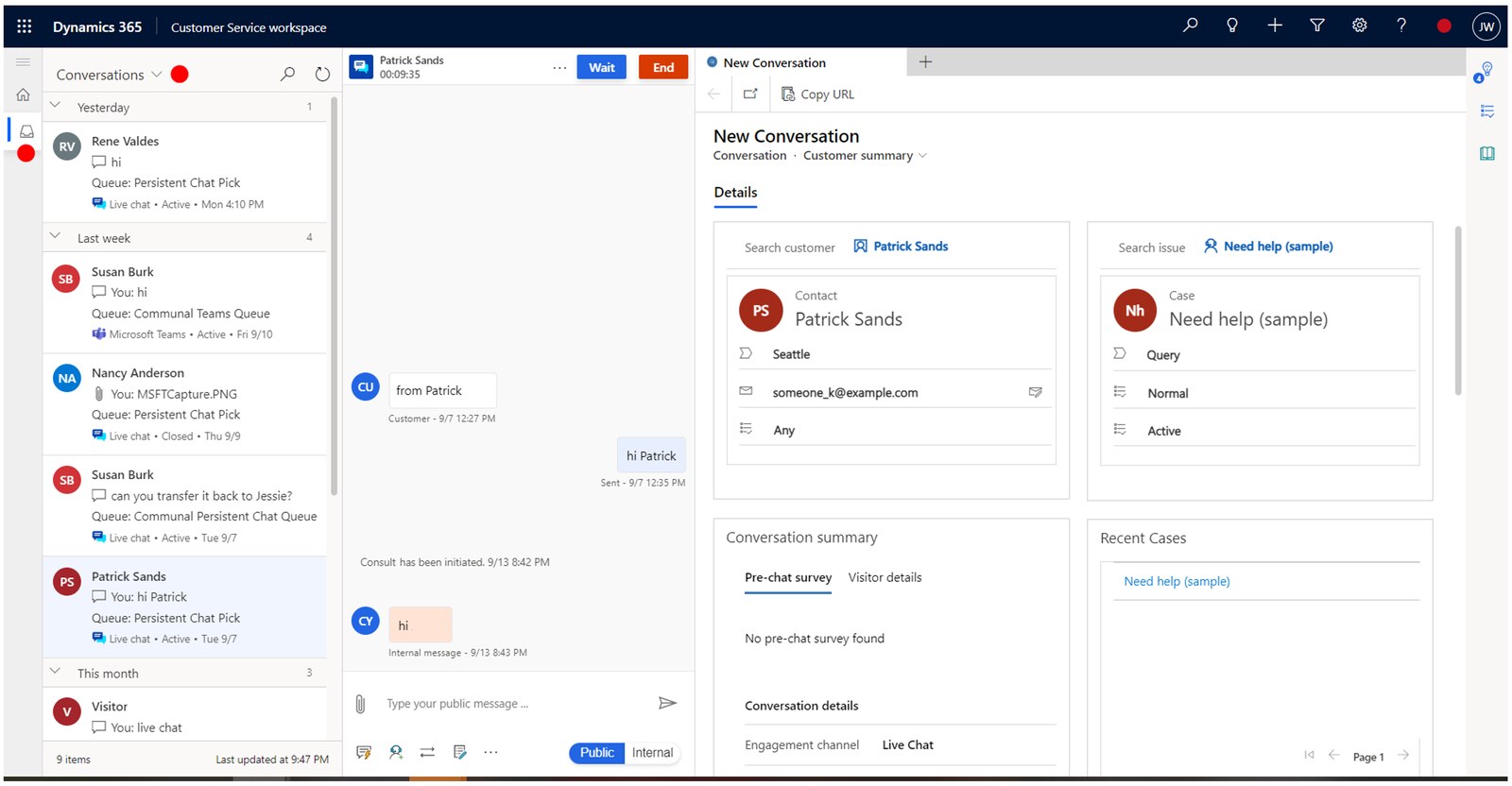
What you can do with Dynamics 365 Contact Center
Generative AI-powered journeys
Copilot handles IVR, chatbots, and real-time replies so agents aren’t rebuilding the same response from scratch.
Omnichannel routing
AI routes voice, chat, SMS, and social queries to the right rep at the right time.
Live insights and transcripts
in-the-moment sentiment analysis, translations, conversation summaries, and dashboards.
Microsoft Teams collaboration embedded
pull in the right expert directly inside the case using Teams integration.
Sound familiar?
When Dynamics 365 Contact Center is worth a closer look
Start with the work that needs to change. These are useful reasons to assess the fit.
- The service model spans digital conversations, voice, or both.
- The contact center must use customer context from an existing CRM.
- Leaders are ready to make explicit decisions about channels, routing, self-service content, and telephony.
What changes for your team
| Pain point | The fix | The result |
|---|---|---|
| Customers bounce across channels, again and again | Omnichannel workflows with unified routing | Higher first-contact resolution and a smoother experience |
| Agents are stuck juggling too many interfaces | Copilot workspace embeds voice, chat, AI summaries, and scripts in one place | Faster resolutions, less burnout |
| Supervisors are flying blind on what’s actually happening | Real-time dashboards, sentiment alerts, and performance insights | Proactive management instead of reactive firefighting |
| Self-service feels clunky and scripted | AI agents with natural voice IVR and smart bots | Higher customer satisfaction, lower deflection costs |
Dynamics 365 Contact Center with TruNova
The partner behind the implementation
TruNova helps teams scope, configure, integrate, train, and support Dynamics 365 Contact Center around the channels and customer context they need to manage.
Separate software from services
Software pricing and implementation costs
US list price checked September 7, 2026. Checkout price can vary by country, currency, and regional terms. Microsoft Product Terms require Customer Service Enterprise for the Contact Center Digital Add-on, Contact Center Voice Add-on, and Contact Center Add-on for Customer Service Enterprise. Other minimum purchase and license prerequisites may apply; confirm your agreement. Digital messaging capacity through Copilot Studio and voice through Azure Communication Services are separate. Prices cover the software subscription; CRM integration, telephony, implementation, data work, training, support, taxes, and partner apps are separate.
| Plan or option | Published US price | Billing and scope |
|---|---|---|
| Dynamics 365 Contact Center | $110.00 USD | per user per month, paid yearly |
| Dynamics 365 Contact Center Digital | $95.00 USD | per user per month, paid yearly |
| Dynamics 365 Contact Center Voice | $95.00 USD | per user per month, paid yearly |
US pricing checked September 7, 2026. Microsoft Dynamics 365 Contact Center pricing Microsoft Dynamics 365 Contact Center product overview Microsoft Dynamics 365 Customer Service documentation Microsoft Dynamics 365 Services Product Terms Prices, availability, taxes, and regional terms may vary.
What changes the implementation budget?
- Digital channels, voice, carriers, Azure Communication Services, telephony, and identity choices determine the channel and integration design.
- CRM connection, customer context, queues, routing rules, conversation history, and agent workspace choices shape data and process work.
- Self-service content, bots, digital messaging capacity, quality processes, reporting, testing, and training affect the delivery effort.
Software fees do not include TruNova implementation services. Our estimate tool provides an initial planning range. We confirm scope, dependencies, and pricing during discovery.
Works with your wider business
Keep the tools. Connect the work.
Dynamics 365 Customer Service
Use Customer Service when the contact center needs a connected CRM service workspace and case process.
Microsoft Copilot Studio
Plan self-service and agent experiences around the capacity, content, handoff, and governance the contact center needs.
Microsoft Teams Phone Standard
Microsoft lists Teams Phone Standard as a related telephony option; calling plans, carriers, and telephony pricing need a separate review.
Where this shows up
Industries that use this most: financial services, healthcare and life sciences, manufacturing, professional services, retail and e-commerce.
Questions about Dynamics 365 Contact Center
Before you decide
What does Dynamics 365 Contact Center licensing cost?
Microsoft lists Contact Center, Contact Center Digital, and Contact Center Voice as per user per month plans paid yearly. Confirm the channel mix, digital messaging capacity, Azure Communication Services, CRM, telephony, Copilot capacity, implementation, support, taxes, and any eligible licensing terms before budgeting.
How do we know if Dynamics 365 Contact Center is a fit?
It is worth assessing when the service model needs digital conversations, voice, or both and the contact center must share context with an existing CRM. Fit depends on channels, queues, routing, self-service content, identity, telephony, reporting, and agent workflows.
What affects the Contact Center implementation schedule?
There is no universal timeline. Channel and telephony decisions, CRM integration, routing, content, bots, digital messaging capacity, security, reporting, testing, and training all affect the work. TruNova confirms the sequence and scope during discovery.
Work with TruNova
Where are you starting?
Start
Outgrown the tools you have? Let us plan the next system around your team.
Optimize
Already using the tools? Let us help with the steps that still take too much work.
Rescue
In the middle of an implementation that is going wrong? Bring us what is stuck.
Support and ongoing education for your system and your team.
Already using Dynamics 365 Contact Center? The $4,000 System optimization review covers one application over two weeks, with up to five priority pain points and a report with cost estimates. Implementation of recommendations is a separate project.

What could your project cost?
Wondering what it would take? Tell the estimate tool a little about your team and your systems for an initial planning range. We can talk through the details together.
A starting point for planning. We confirm scope and pricing during discovery.